Most accounting software lists push tools built for teams. If you are a sole trader with no employees, you need something simpler, cheaper, and built around Schedule C. This guide covers the 6 tools that actually fit a one-person business in 2026, with honest pricing, a comparison table, and the decision framework to pick the right one in 5 minutes.
Aziz Chaabane13 min read5 June 2026
Share
On this page
Quick answer
If you are a sole trader, sole proprietor, or freelancer with no employees, you do not need the same accounting software as a 20-person company. You need something that handles Schedule C categorization, tracks deductible expenses, connects to your bank, and produces the reports your accountant or tax software will ask for at filing time. The best option for most sole traders in 2026 is QuickBooks Solopreneur at $20 per month, which was built specifically for one-person businesses. If you are pre-revenue or earning under $50,000, Zoho Books Free or Wave Starter will handle your needs at zero cost. This guide covers the six tools that actually make sense when you are the entire business.
Most guides to finding the best accounting software for sole traders are actually written for businesses with employees, inventory, and payroll. If you are a sole trader filing a Schedule C, those lists are sending you toward software that is more complex and more expensive than what you actually need. You will end up paying $65 a month for features designed for a 15-person team when your entire operation is you, a laptop, and a bank account.
This guide is for the person who runs the business alone. No employees. No payroll. No inventory beyond maybe a few digital products. You need clean books, accurate tax categorization, and something that does not make you dread the first of every month. For the broader accounting software landscape that includes payroll, multi-user, and inventory features, the full accounting software comparison covers those. This one is deliberately narrower because your needs are different.
Why Sole Traders Need Different Software
The difference between a sole trader and a small business with employees is not just size. It is structural. Your tax obligations are different, your reporting needs are simpler, and the features that matter to you are completely different from the features that matter to a company running payroll for eight people.
Aziz's take
Most sole traders pick their accounting software by Googling "best accounting software" and clicking the first result. That result is always QuickBooks Online, which is a great product for a business with employees and complexity. For a one-person operation, it is like renting a warehouse to store a backpack. You need software that matches how you actually work, not how a 20-person company works.
As a sole proprietor in the United States, your business income flows through to your personal tax return on Schedule C of Form 1040. That means the single most important thing your accounting software does is categorize your expenses into the same buckets the IRS expects on Schedule C: advertising, car and truck expenses, contract labor, insurance, office expenses, and the rest. Software that does this well saves you hours at tax time. Software that does not means you are manually recategorizing everything in February.
The other structural difference: you do not need multi-user access, team permissions, payroll, or project-based accounting. Every dollar you spend on those features is a dollar wasted. An estimated 9.69 million Americans are unincorporated self-employed workers, and most of them are paying for accounting features they will never touch.
The 6 Best Accounting Tools for Sole Traders in 2026
These six tools are the ones that actually make sense when you have no employees and file Schedule C. They are ordered by price, starting with the free options that are genuinely capable and moving up to the paid tools that justify their cost for specific reasons.
Every price below was checked on the vendor's own pricing page on 2 October 2026. Several of them discount the first few months for new customers; the figures here are the regular monthly prices you pay after that.
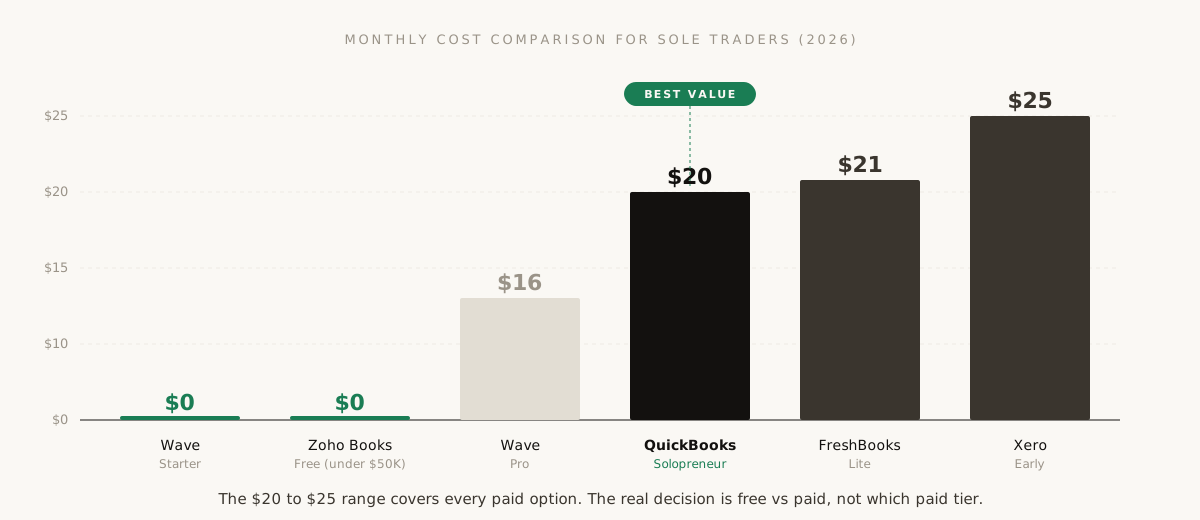
The price spread between all six tools is $0 to $27 per month. The paid options are clustered so tightly ($19 to $27) that the decision should be about features, not cost.
Best free option (pre-revenue)
1. Wave Starter
$0/mo
Wave's free Starter plan gives you unlimited invoicing, basic income and expense tracking, receipt scanning, and basic reports at zero cost. It makes money on payment processing (2.9% plus $0.60 per credit card transaction) and optional add-ons, not on the accounting features themselves.
What it does well: Invoice creation, basic expense tracking, receipt capture via mobile app. If all you need is to send invoices and have a record of what came in and what went out, Wave handles it without charging you anything.
What it does not do: The free plan does not include automatic bank reconciliation, which means you cannot systematically match transactions to your bank statement to catch errors. You also cannot add additional users or get live customer support. NerdWallet's 2026 review notes that Wave's free plan works best for freelancers with low transaction volume who do not yet need proper reconciliation.
Best for: Sole traders who are pre-revenue or in their first year, sending fewer than 20 invoices per month, and not yet ready to pay for accounting software. Upgrade to Wave Pro ($19 per month) when you need bank reconciliation.
Best free option (under $50K revenue)
2. Zoho Books Free
$0/mo
Zoho Books offers a permanently free plan for any business earning under $50,000 in annual revenue. Unlike Wave's Starter, Zoho's free plan includes bank feeds, automatic transaction categorization, and basic automation workflows.
What it does well: The automation is surprisingly capable at no cost. You can set rules to auto-categorize transactions, send payment reminders, and reconcile accounts. Up to 1,000 invoices per year, which is more than enough for most sole traders.
What it does not do: Single user only. Limited reporting compared to paid tiers. The $50,000 revenue cap means you will outgrow the free plan once the business gains real traction, and the transition to a paid Zoho plan ($15 per month for Standard) is smooth but not free.
Best for: Solo freelancers and sole proprietors in years one and two who earn under $50K and want more capability than Wave's free tier without paying for it. The bank feeds and auto-categorization alone make it more functional than most free options.
Best overall for sole traders
3. QuickBooks Solopreneur
$0 / $20/mo
QuickBooks Solopreneur is the successor to QuickBooks Self-Employed, rebuilt specifically for one-person businesses. At $20 per month (or $215 annually), it gives you automatic Schedule C categorization, mileage tracking via GPS, quarterly estimated tax calculations, and a streamlined dashboard that hides the complexity you do not need.
QuickBooks' pricing page now lists three Solopreneur tiers: Free at $0, Lite at $20 and Simple Start at $38 a month. Check which features sit in which tier before you commit; the review below describes the paid experience.
What it does well: The killer feature is automatic Schedule C mapping. Every transaction you categorize goes directly to the correct line on your tax return. The mileage tracker runs in the background on your phone and logs business trips automatically. The quarterly tax estimate feature calculates what you owe and when, which alone prevents the estimated tax penalty that catches most first-year sole proprietors.
What it does not do: It is deliberately simpler than QuickBooks Online. No inventory management, no project tracking, no multi-user access. If you outgrow it and need the full QuickBooks Online suite, migration is straightforward since it is the same ecosystem.
Best for: Any sole trader who earns enough to justify $20 per month and wants the cleanest path from daily bookkeeping to annual tax filing. If you hate dealing with your taxes and want your accounting software to do most of the thinking for you, this is the one.
Best for invoicing-heavy businesses
4. FreshBooks Lite
$23/mo
FreshBooks Lite at $23 per month started as an invoicing tool and expanded into full accounting. That heritage shows. If you send invoices to clients regularly and your primary accounting need is tracking who owes you what and when, FreshBooks has the best invoicing experience of any tool on this list.
What it does well: Professional invoice creation, built-in time tracking, automatic payment reminders, and a client portal where customers can view and pay invoices in one click. The late payment reminder system is particularly effective. For a deeper look at how FreshBooks compares to other invoicing tools specifically, see our best invoicing software for freelancers guide.
What it does not do: The Lite plan caps you at 5 billable clients. If you work with more than five, you need Plus at $38 per month, which is a steep jump. FreshBooks also does not have the same tax-specific features that QuickBooks Solopreneur does. No automatic Schedule C categorization, no quarterly tax estimates.
Best for: Consultants, designers, writers, and service providers who invoice clients regularly and want the invoicing process to feel professional and automated. Less ideal if your business is product-based or if tax integration is your primary concern.
Best growth path to a bigger business
5. Xero Early
$27/mo
Xero's Early plan at $27 per month is the entry point to a platform that scales all the way to enterprise. Unlimited users on every plan, strong bank reconciliation, and integrations with over 1,000 third-party apps. If you expect to grow beyond a one-person operation within the next year or two, starting on Xero now means you will not need to migrate later.
What it does well: Bank reconciliation is fast and accurate. The mobile app is excellent. Unlimited user access means you can give your accountant full access at no additional cost from day one. The app marketplace is the largest of any platform on this list.
What it does not do: The Early plan limits you to 20 invoices and 5 bills per month. If you invoice more than 20 clients monthly, you need the Growing plan at $42 per month. Xero also does not include US payroll natively, so when you do eventually hire, you need a third-party payroll integration like Gusto.
Best for: Sole traders who plan to grow. If you expect to hire a contractor or employee within the next 12 months, or if your accountant already uses Xero, start here and skip the future migration headache.
Best all-in-one (banking + accounting)
6. Found
Free banking + paid plans
Found combines a business bank account with built-in bookkeeping, invoicing, and tax tools in a single platform. There is no separate accounting software to set up because the accounting is wired directly into your banking. Transactions are categorized as they happen, tax estimates update in real time, and your quarterly payments can be made directly from the app.
What it does well: Eliminates the friction of connecting bank accounts to accounting software, because they are the same thing. Automatic tax set-asides reserve a percentage of every deposit for estimated taxes so you are never caught short at quarterly payment time. The interface is designed for people who find traditional accounting software intimidating.
What it does not do: Newer platform with a smaller feature set than established tools. Fewer integrations than QuickBooks or Xero. If you already have a business bank account you like, switching is a significant commitment. Not the right choice if you need advanced reporting or want to give an accountant granular access to your books.
Best for: New sole traders who have not yet opened a business bank account and want everything in one place from the start. The automatic tax set-aside feature alone is worth considering if you struggle with quarterly estimated payments.
Side-by-Side Comparison Table
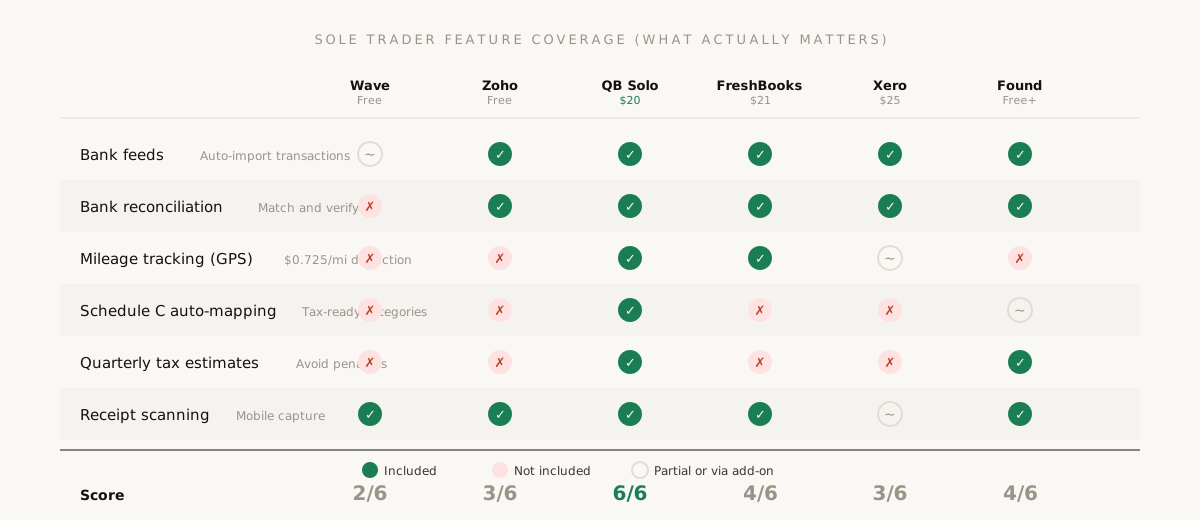
The table below compares the six tools on the features that actually matter for a sole trader. Features like payroll, inventory, and multi-currency are excluded because if you need those, you are not the audience for this guide.
Only QuickBooks Solopreneur covers all six features that matter most for sole traders. The free tools cover two to three. FreshBooks and Found cover four each.
Sole trader accounting software comparison (2026)
Feature
Wave Free
Zoho Free
QB Solopreneur
FreshBooks Lite
Xero Early
Found
Monthly price
$0
$0
$0 / $20
$23
$27
Free + paid tiers
Bank feeds
Read-only
Yes
Yes
Yes
Yes
Built-in
Bank reconciliation
No (Pro only)
Yes
Yes
Yes
Yes
Automatic
Invoicing
Unlimited
1,000/yr
Yes
5 clients
20/mo
Yes
Mileage tracking
No
No
GPS auto-track
Yes
Via app
No
Schedule C mapping
No
No
Automatic
No
No
Partial
Quarterly tax estimates
No
No
Yes
No
No
Yes (auto set-aside)
Receipt scanning
Yes
Yes
Yes
Yes
Via Hubdoc
Yes
Accountant access
No
No
Limited
Yes
Unlimited users
Limited
Best for
Pre-revenue
Under $50K
Most sole traders
Invoice-heavy
Planning to grow
New, wants all-in-one
Aziz's take
If you earn under $50K, use Zoho Books Free. If you earn over $50K, use QuickBooks Solopreneur. That is the honest two-sentence version. Everything else on this list is for a specific edge case: FreshBooks if invoicing is your life, Xero if you plan to hire soon, Found if you want banking and accounting merged, Wave if you want the absolute minimum at zero cost. Most sole traders should pick one of the first two and stop overthinking it.
How to Choose: The Decision Framework
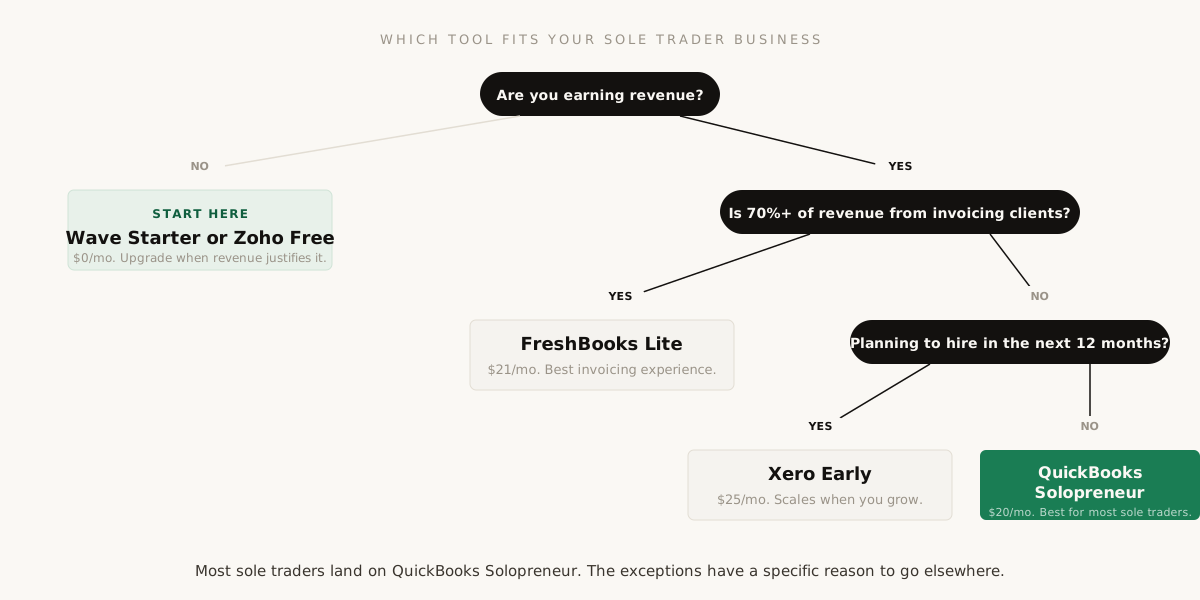
Instead of comparing feature lists, answer four questions. Your answers point directly to the right tool.
Four questions, one answer. Most sole traders follow the right branch all the way down to QuickBooks Solopreneur. The exceptions have a specific reason to go elsewhere.
The 4-question decision framework
1
Are you earning revenue yet?
If no, use Wave Starter or Zoho Books Free. There is no reason to pay for accounting software before you have money to account for. Start free, upgrade when revenue justifies it.
2
How much of your income comes from invoicing clients?
If more than 70% of your revenue involves sending invoices and waiting for payment, FreshBooks Lite is the strongest choice. If most of your revenue comes through a platform (Stripe, Shopify, Etsy), invoicing is less critical and QuickBooks Solopreneur is better.
3
Do you drive for business?
If you drive to client meetings, job sites, or anywhere else for business, mileage tracking matters. At $0.725 per mile in 2026, 5,000 business miles is $3,625 in deductions. QuickBooks Solopreneur tracks this automatically via GPS. The others either do not offer it or require a third-party app.
4
Will you hire anyone in the next 12 months?
If yes, start on Xero. You will not need to migrate to a different platform when you add your first employee or contractor. If no, optimize for today and switch later if the situation changes.
What a Sole Trader's Accounting Stack Actually Costs
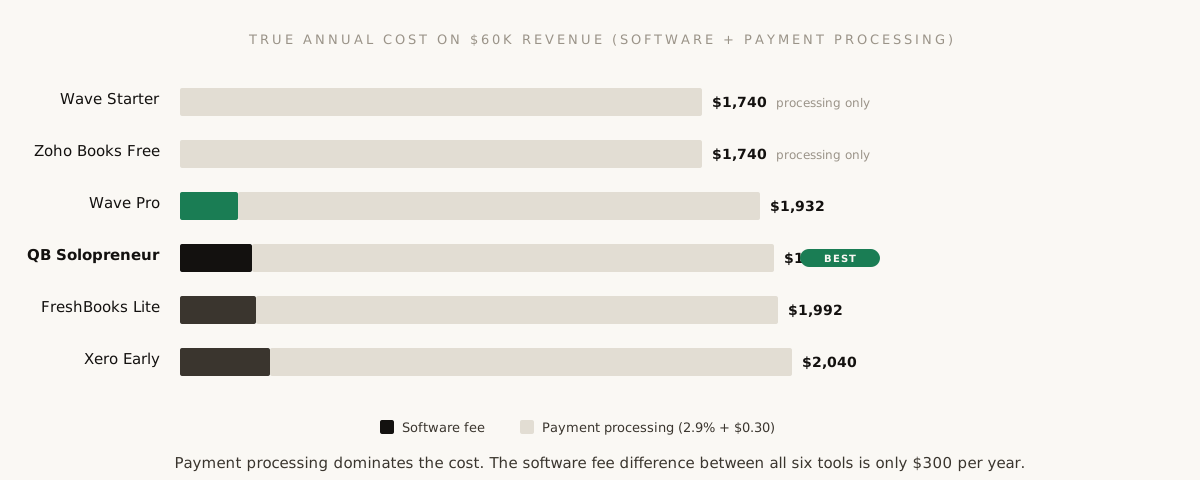
The sticker price of accounting software is not the whole cost. Payment processing fees, add-ons, and the time you spend inside the tool all factor in. Here is what each option actually costs over a year for a typical sole trader sending 10 invoices per month and processing $5,000 in monthly revenue through credit card payments.
Payment processing fees dominate every option. The software fee is the smaller portion. The total annual difference between the cheapest free tool and the most expensive paid tool is only $324.
Wave Starter (free path)
Software: $0. Payment processing: $1,740 per year (2.9% of $5K monthly; per-transaction fees vary by processor and are not included). Total: ~$1,740 per year. Most of that cost exists regardless of which tool you use because payment processing fees are roughly the same everywhere.
QuickBooks Solopreneur
Software: $240 per year ($20 times 12). Payment processing: ~$1,740 per year (same rates). Total: ~$1,980 per year. The $240 difference buys you automatic tax categorization, mileage tracking, and quarterly estimates. Worth it once you are earning consistently.
FreshBooks Lite
Software: $276 per year ($23 times 12). Payment processing: ~$1,740 per year. Additional user: $132 per year if you add your accountant. Total: ~$2,016 to $2,148 per year.
Xero Early
Software: $324 per year ($27 times 12). Payment processing: ~$1,740 per year (via Stripe integration). Unlimited users included. Total: ~$2,064 per year. The accountant access at no extra cost partially offsets the higher software price.
The total annual cost difference between the cheapest paid option (QuickBooks at $240 per year) and the most expensive (Xero at $324 per year) is $84. Seven dollars a month. At that price difference, the decision should be based entirely on which features match your workflow, not on cost. The real cost savings come from choosing a free tool when you are pre-revenue, not from trying to save $7 per month between paid options.
For a deeper look at how these costs fit into the broader financial picture of your business, the guide to creating a business budget shows where accounting software sits in the typical SaaS and operating expense breakdown.
The Schedule C Test: Does Your Software Pass It?
This is the test that matters most for sole traders and the one that most "best accounting software" lists ignore entirely. Your business income is reported on Schedule C of Form 1040. That form has specific expense categories: advertising, car and truck expenses, contract labor, depreciation, insurance, interest, legal and professional services, office expenses, rent, repairs, supplies, taxes and licenses, travel, meals, utilities, and other expenses.
Aziz's take
The real test of accounting software for a sole trader is not the feature list. It is this: on April 14, when you are doing your taxes, does your software give you a clean report that maps directly to Schedule C line items? Or are you spending six hours recategorizing "Miscellaneous" into the 20 categories the IRS actually wants? That six-hour recategorization session is the hidden cost of choosing the wrong software.
Good accounting software for a sole trader does two things with those categories. First, it lets you assign each transaction to a category that maps to Schedule C. Second, it generates a report at year end that shows the total for each category, ready to plug into your tax return or hand to your accountant. QuickBooks Solopreneur does this automatically. The other tools on this list can do it with manual category setup, but you have to configure the categories yourself.
If your business structure is still undecided and you are wondering whether the LLC route changes any of this, the LLC vs sole proprietorship guide covers how each structure affects your tax filing. And the full list of deductions you should be tracking in those categories is in the small business tax deductions guide.
For the broader picture of how accounting fits into the full financial system of your business alongside cash flow, metrics, and budgeting, the complete small business finance guide ties it all together. If you would rather not touch the categorizing yourself at all, see our guide to bookkeeping software for freelancers, which covers the done-for-you alternative to the tools above.
Frequently Asked Questions
It depends on four answers. If you are not earning yet, use Wave Starter or Zoho Books Free. If more than 70% of your revenue comes from invoicing clients, FreshBooks Lite is the strongest choice. If you will hire within 12 months, start on Xero. Otherwise most sole traders end up on QuickBooks Solopreneur, mainly for its automatic tax categorization and GPS mileage tracking.
Partly. QuickBooks' pricing page lists a Free Solopreneur tier at $0 a month, alongside Lite at $20 and Simple Start at $38 a month (checked 2 October 2026). Check which features each tier includes before you choose; the automatic categorization and mileage tracking described in this guide come from the paid experience.
Of the six tools compared here, Xero has the strongest mobile app, QuickBooks Solopreneur tracks business mileage automatically by GPS on your phone, and Wave's free plan includes receipt capture through its mobile app. Pick the one whose app does the job you do most often away from your desk.
If you have fewer than 10 to 15 transactions per month and you are comfortable with spreadsheets, you can track your income and expenses manually for your first year. A simple spreadsheet with columns for date, description, amount, and Schedule C category is enough to file your taxes. The moment you find yourself spending more than 30 minutes per week on bookkeeping, or the moment you miss a deduction because it slipped through the cracks, accounting software pays for itself. Most sole traders reach that tipping point within 6 to 12 months of earning consistent revenue.
Yes. All major platforms allow you to export your data as CSV files, and most have import tools that accept data from competitors. The best time to switch is at the start of a new calendar year so you have a clean break between the old system and the new one. You will need to rebuild templates and reconfigure any automations, but your historical data transfers. Many sole traders start on a free tool like Wave or Zoho, learn what they need, and migrate to QuickBooks or Xero once revenue justifies the cost. That is a perfectly reasonable and common path.
QuickBooks Solopreneur is a simplified version of QuickBooks built specifically for one-person businesses. It focuses on expense tracking, mileage, invoicing, and Schedule C tax preparation. QuickBooks Online is the full small business accounting suite with inventory management, project tracking, multi-user access, payroll integration, and advanced reporting. Solopreneur costs $20 per month. QuickBooks Online starts at $35 per month for Simple Start and goes up to $275 per month for Advanced. If you are a sole trader with no employees and no inventory, Solopreneur gives you everything you need at a lower price without the complexity you do not need. If your business grows to the point where you need payroll or inventory, migrating from Solopreneur to Online is straightforward because they share the same platform.
Wave's Starter plan is genuinely free for accounting and invoicing features. There is no trial period and no cap on how long you can use it. The way Wave makes money is through optional paid services: payment processing at 2.9% plus $0.60 per credit card transaction, Wave Pro at $19 per month for bank reconciliation and advanced features, and payroll starting at $40 per month plus $6 per employee. If you only use the free accounting and invoicing features and collect payments outside of Wave (via direct bank transfer, for example), you pay nothing. The limitation is that the free plan does not include bank reconciliation, which means you cannot systematically match and verify transactions against your bank statement.
If you already have an accountant, ask them what they prefer. Many accountants have a strong preference for QuickBooks or Xero because those platforms offer accountant-specific access portals that make year-end work significantly faster. If your accountant uses QuickBooks, giving them access to your QuickBooks Solopreneur account takes 30 seconds and costs nothing. If they use Xero, Xero includes unlimited users on all plans so your accountant gets full access at no extra cost. Using a different platform from your accountant is not a dealbreaker, since they can always work from exported reports, but it adds friction and potentially hours to your annual tax preparation bill.
The weekly letter
One guide a week, and the working behind it.
Every guide is researched and written by one person, cited against a real source, and sent once. No drip sequence, no upsell.
Published Monday, Wednesday and Friday. One email covers all three
The number that surprised me most that week, and where it came from
One click to leave, and the address is never shared
Free. One email a week. One click to leave.
The founder's toolkit
Four templates and a priced benchmark.
Everything scattered across the site, in one download, kept current.
XLSXTool pricing benchmark8.5 KB
PDFBusiness plan template8.0 KB
PDFLean canvas template6.6 KB
PDFSOP template4.7 KB
The zip arrives in one email, straight away.
Then one email a week, only when something new is published.
Leave in one click. The address is never shared or sold.
The three tools on this site ask for nothing and never will. This download is the exception, because it is the only thing here that has to be kept current: the benchmark is repriced every quarter, and a stale price is worse than none.